Character weirdness

I’ve got something that feels like a bug or something I just don’t understand about filters.

Two things. First, I was entering a new character into the software and it absolutely refused to let me type in certain specific death dates. I generally put a default “50-100 year life span” for all newly entered characters until I later decide when they actually die. This used to work nicely, but now it’s giving me grief. Notice the red outline around the date below despite the fact that this should be valid.

image

It lets me put the year in without the month, but entering a month makes it invalid. Other times it lets me put in things like “Apr 2888” but “May 2888” it says is invalid. Very weird. I ended up having to use the mouse to slide the character’s end point to the correct spot.

Next, I’ve got a filtering problem that I have somehow created. I’ve got a filtered view that just shows my character Nyx. This makes her age show up in the top ruler, which is what I want. But within this view, I created two more characters: Juniper and Aurelian. I put in their birth/death dates and got to the point where I wanted to filter them back out. Only I realized… the view already was set to Nyx only! So these new characters now seem to be permanently filtered along with Nyx as if they were one person. See screenshot below.
image

This feels like a bug to me. Is there any way I can get the two new characters to not appear when I filter for Nyx alone?

I am missing something since death does not effect age calculation, why put in a presumptive death date in the future. I am not seeing the advantage of this.

1 Like

Because I have a super long timeline and I can’t have long-dead characters showing up in the timeline when they would just clutter it up because they’d be 1700 years old in that part of the story. Mortals gotta die. Immortals keep going.

Oh, I should also add that I no longer see the movement offset near my mouse as I’m moving something within the timeline. In the previous version AT3 used to show things like “-2 months” etc. as you drag it to a new position, showing the important in formation about how far you’ve slid it in time. Is there any way to get this back?

Look at your date precision in the Inspector for death, is it set for the full date or year only? If set for year only that may explain the issue

It’s set to “month and year”

Never knew Date Precision was a feature. But that doesn’t seem to be the issue.

Hey @Recon with the filtering question, do those other two characters have a relationship with Nyx? If so, they’ll still show up when the filter is applied. Setting another filter on the label to exclude those characters should help.


If they don’t have a relationship with Nyx, it’s probably a bug. Please send us a copy of your file if that’s the case.

With the dates one, could you take a screen recording so we can see it in action? Otherwise, we can take a look at your file to try to see what’s going on.

This has been removed in the latest release in favor of the blue text to preview the end result when dragging or editing the dates on an item. It may come back in an improved form in a future update, though.

In the meantime, you might find the ‘Shift Dates By’ function helpful if you want to move something forward or backward by a specific amount of time.


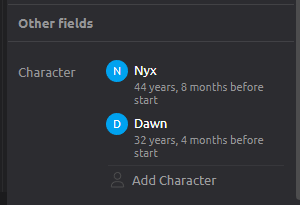
Oh hey that’s very interesting. You’re right, there IS a relationship.
But it’s not a relationship I put in there knowingly.
Also I had to open the “Other Fields” section to see it.

image

I just tried it again to verify. Made a fake character within this view and it applied a relationship automatically. It appears this happens whenever creating a character within a filtered UI view. The software seems to put relationships in place in order to keep that character visible with the current view settings (?)

As for the shift dates feature, that’s cool, I didn’t know that was a way of doing it. I found the offset text helpful, for what it’s worth, so I’m sorry to see it go. If you’d like to improve it so it can be returned, I look forward to that.

Yes actually, here’s a video!

https://www.youtube.com/watch?v=n9TvunRYicw

For some reason it does not like me typing the months March or May for dates, although it is perfectly happy to let me drag dates to March or May.

Hi,
Thanks for the video, that definitely looks like a bug.

Unfortunately, I cannot recreate it directly in a new timeline file - typing “Mar/March” and “May” both work as expected - so I think there must be something specific happening in your timeline.

Can you confirm that if you create a new timeline using one of our templates, are you able to type these months correctly?

The quickest path for us to reproduce and fix the issue would be if you can email a copy of your timeline file to support@aeontimeline.com

We treat all files sent to us confidentially, but if you don’t want to send us your full timeline file, you could try saving a separate copy of the file and deleting the majority of the contents. So long as the issue still occurs after deletion, it is fine to send us through the smaller test case.

Just make sure you save a backup/copy first so you don’t inadvertently delete data from the main file!

Thanks,
Matt

Okay I’ve stripped the project file down to absolutely nothing (apart from my custom eras, which may or may not be the cause). Added a test character to verify the bug still happens and emailed to you.
Pretty weird, as your default template does not have this behavior. Just my timeline.

Hi,
Thanks for the file, it has helped us identify the source of the issue:

  • Your calendar includes a custom era name with an abbreviation “MA”.

  • When you type “Mar” or “May”, the date text conversion is getting confused and matching this against the “MA” era.

We will fix this in a future update address this particular scenario.

For the moment, could you change the abbreviate name for that era (e.g. to “MYA” or something similar) to workaround the issue?

Thanks,
Matt

1 Like

Thanks for finding that! What a peculiar issue.

I have a question for you. I remember discovering, when I first created my timeline, that the “eras” cannot be edited once items are put into the timeline.

Is this still true?

Once a timeline has dated events/items, you are able to rename the parts of custom calendars, but you cannot add/delete or otherwise modify them.

Allowing this is on our list of improvements to consider in the future, but it isn’t in our immediate plans.